
Explanation:
Option B is correct because gcloud compute routers get-status provides detailed BGP information, including learned routes, their attributes (like MED and AS_PATH), and which routes the Cloud Router has selected as best, directly helping to diagnose BGP path selection causing asymmetry.
Option A (VPC Flow Logs) only confirms asymmetry but doesn't explain the BGP cause. Option C (Console BGP sessions) provides BGP data but get-status offers a more direct view of the Cloud Router's best path decision. Option D (gcloud compute routers describe) shows static configuration, not the dynamic BGP state needed for troubleshooting path selection.
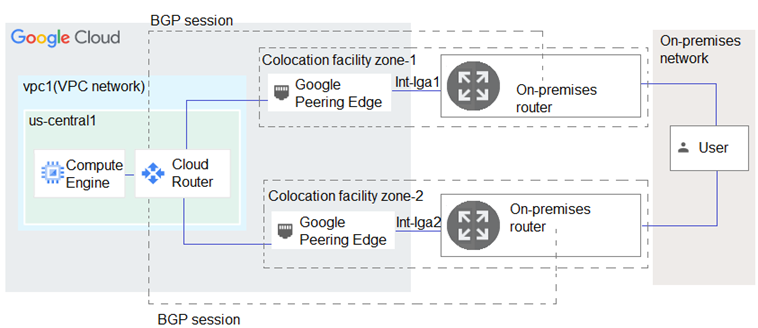
You have the networking configuration shown in the diagram. Two VLAN attachments associated with two Dedicated Interconnect connections terminate on the same Cloud Router (mycloudrouter). The Interconnect connections terminate on two separate on-premises routers. You advertise the same prefixes from the Border Gateway Protocol (BGP) sessions associated with each of the VLAN attachments.
You notice an asymmetric traffic flow between the two Interconnect connections. Which of the following actions should you take to troubleshoot the asymmetric traffic flow?
A
From the Google Cloud console, navigate to Cloud Logging to view VPC Flow Logs and review the results.
B
From the Cloud CLI, run gcloud compute –-project PROJECT_ID routers get-status mycloudrouter –-region REGION and review the results.
C
From the Google Cloud console, navigate to the Hybrid Connectivity, select the Cloud Router, and view BGP sessions.
D
From the Cloud CLI, run gcloud compute routers describe mycloudrouter –-region REGION and review the results.
No comments yet.