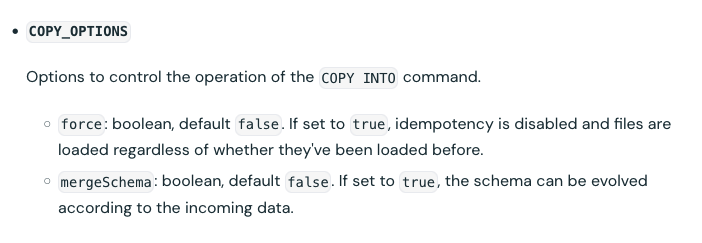
Explanation:
E: None of the above — because the correct syntax is:
COPY INTO my_table
FROM '/path/to/files'
FILEFORMAT = CSV
FORMAT_OPTIONS ('header' = 'true', 'inferSchema' = 'true')
COPY_OPTIONS ('mergeSchema' = 'true');
COPY INTO my_table
FROM '/path/to/files'
FILEFORMAT = CSV
FORMAT_OPTIONS ('header' = 'true', 'inferSchema' = 'true')
COPY_OPTIONS ('mergeSchema' = 'true');
Reference: https://docs.databricks.com/aws/en/sql/language-manual/delta-copy-into#format-options
https://docs.databricks.com/aws/en/sql/language-manual/delta-copy-into
As a data engineer, you're tasked with loading external CSV files into a Delta table using the COPY INTO command. After the initial load, the schema of one file changes due to a new column, causing the data load to fail. Which SQL command will resolve this issue?
A
COPY INTO my_table
FROM '/path/to/files'
FILEFORMAT = CSV
FORMAT_OPTIONS ('overWriteSchema' = 'true')
COPY_OPTIONS ('overWriteSchema' = 'true');
``
COPY INTO my_table
FROM '/path/to/files'
FILEFORMAT = CSV
FORMAT_OPTIONS ('overWriteSchema' = 'true')
COPY_OPTIONS ('overWriteSchema' = 'true');
``
B
COPY INTO my_table
FROM '/path/to/files'
FILEFORMAT = CSV
FORMAT_OPTIONS ('mergeSchema' = 'true')
COPY_OPTIONS ('mergeSchema' = 'true');
COPY INTO my_table
FROM '/path/to/files'
FILEFORMAT = CSV
FORMAT_OPTIONS ('mergeSchema' = 'true')
COPY_OPTIONS ('mergeSchema' = 'true');
C
COPY INTO my_table
FROM '/path/to/files'
FILEFORMAT = CSV
FORMAT_OPTIONS ('mergeSchema' = 'true')
COPY_OPTIONS ('overWriteSchema' = 'true');
``
COPY INTO my_table
FROM '/path/to/files'
FILEFORMAT = CSV
FORMAT_OPTIONS ('mergeSchema' = 'true')
COPY_OPTIONS ('overWriteSchema' = 'true');
``
D
COPY INTO my_table
FROM '/path/to/files'
FILEFORMAT = CSV
FORMAT_OPTIONS ('overWriteSchema' = 'true')
COPY_OPTIONS ('mergeSchema' = 'true');
COPY INTO my_table
FROM '/path/to/files'
FILEFORMAT = CSV
FORMAT_OPTIONS ('overWriteSchema' = 'true')
COPY_OPTIONS ('mergeSchema' = 'true');
E
None of the above