
Explanation:
The question involves a DROP TABLE command on an external (unmanaged) table. From the DESCRIBE EXTENDED output (not shown but implied by the discussion), we can infer this is an external table. For external tables in Databricks, dropping the table only removes the metadata from the metastore while leaving the underlying data files untouched. This aligns with option E. The community discussion shows a split: some comments (with upvotes) correctly identify E as the answer for external tables, while others note that if the DROP statement was missing 'TABLE' (as in the original question text), it would be invalid and the table would remain (option B). However, the corrected question text shows the proper DROP TABLE syntax, making E the correct choice based on external table behavior.
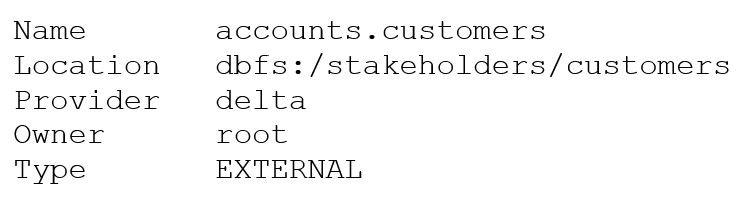
After running DESCRIBE EXTENDED accounts.customers;, the following output was generated:
//IMG//
A data analyst then executes the command:
DROP TABLE accounts.customers;
DROP TABLE accounts.customers;
What is the result of executing this command?
A
Running SELECT * FROM delta. dbfs:/stakeholders/customers results in an error.
B
Running SELECT * FROM accounts.customers will return all rows in the table.
C
All files with the .customers extension are deleted.
D
The accounts.customers table is removed from the metastore, and the underlying data files are deleted.
E
The accounts.customers table is removed from the metastore, but the underlying data files are untouched.
No comments yet.