
Explanation:
Option D is correct because it uses dataset versioning with tags, which satisfies all requirements: (1) It loads all sales data into a structure convertible to a DataFrame by referencing each file explicitly. (2) It enables filtering data before a specific month by using the 'month' tag to identify versions, allowing experiments to use only data up to a certain point. (3) It registers the minimum number of datasets (one dataset entity) by creating new versions each month instead of separate datasets, aligning with Azure ML best practices for versioning. Option B is incorrect because it uses a wildcard path ('sales/*/sales.csv'), which loads all data into one dataset without versioning, making it impossible to filter out data after a specific month without additional complex filtering. Option A replaces the dataset each month, losing historical versions. Option C registers multiple datasets, violating the 'minimum number' requirement.
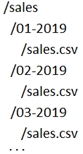
You have multiple CSV files with identical schemas stored in an Azure blob datastore. Each file is named sales.csv and is located in a month-year named folder under a parent sales directory. A new folder is added each month. You need to register a dataset for training a model with these requirements:
What should you do to register this sales data as a dataset in your Azure Machine Learning workspace?
A
Create a tabular dataset that references the datastore and explicitly specifies each 'sales/mm-yyyy/sales.csv' file every month. Register the dataset with the name sales_dataset each month, replacing the existing dataset and specifying a tag named month indicating the month and year it was registered. Use this dataset for all experiments.
B
Create a tabular dataset that references the datastore and specifies the path 'sales/*/sales.csv', register the dataset with the name sales_dataset and a tag named month indicating the month and year it was registered, and use this dataset for all experiments.
C
Create a new tabular dataset that references the datastore and explicitly specifies each 'sales/mm-yyyy/sales.csv' file every month. Register the dataset with the name sales_dataset_MM-YYYY each month with appropriate MM and YYYY values for the month and year. Use the appropriate month-specific dataset for experiments.
D
Create a tabular dataset that references the datastore and explicitly specifies each 'sales/mm-yyyy/sales.csv' file. Register the dataset with the name sales_dataset each month as a new version and with a tag named month indicating the month and year it was registered. Use this dataset for all experiments, identifying the version to be used based on the month tag as necessary.
No comments yet.