
Explanation:
The Apply Transformation module in Azure Machine Learning designer is used to apply a previously saved transformation to a new dataset, not to combine or merge multiple datasets. The goal requires concatenating all rows from both datasets while maintaining the same columns and header structure, which is typically achieved using modules like 'Join Data' (for combining based on common columns) or 'Add Rows' (for vertical stacking when schemas match). The community discussion strongly supports this with 67% selecting 'No', and key comments explain that Apply Transformation doesn't perform dataset merging operations. The Apply SQL Transformation component (mentioned in one comment) also doesn't fit this specific requirement as it's for SQL queries rather than simple row concatenation.
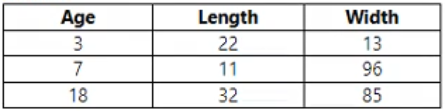
You are using Azure Machine Learning designer. You have two datasets, Dataset1 and Dataset2. You need to create a new dataset that includes all rows from both input datasets and has the same columns and header row.
Solution: You use the Apply Transformation module.
Does this solution achieve the goal?
A
Yes
B
No
No comments yet.