
Explanation:
The correct answer is A because Model.get_model_path('loan_model') is the proper Azure ML SDK method to retrieve the path of a registered model in a scoring script. This method automatically handles the model path resolution within the Azure ML environment, ensuring the model can be loaded correctly by the real-time service. Option B ('model.pkl') is incorrect as it uses a hardcoded local path that won't work in the deployed service environment. Option C (ws.models('loan_model')) is invalid syntax - the correct method to get a model object is Model(ws, 'loan_model'), but this returns a model object, not the file path needed for loading. Option D ('outputs/model.pkl') is also a hardcoded path that assumes a specific directory structure that may not exist in the deployed service context. The community discussion shows consensus with answer A receiving 5 upvotes and being marked as correct.
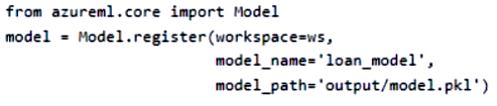
You register a model in an Azure Machine Learning workspace by running the following code:
from azureml.core import Model

model = Model.register(
    workspace=ws,
    model_name='classification-model',
    model_path='model.pkl',
    description='A classification model'
)
from azureml.core import Model

model = Model.register(
    workspace=ws,
    model_name='classification-model',
    model_path='model.pkl',
    description='A classification model'
)
You are creating a scoring script to use in a real-time service for the model.
You need to write code in the scoring script to set the path of the registered model so that it can be loaded by the service. You include the necessary import statements.
Which code segment should you use?
A
path = Model.get_model_path(‘loan_model’)
B
path = ‘model.pkl’
C
path = ws.models(‘loan_model’)
D
path = ‘outputs/model.pkl’
No comments yet.