
Explanation:
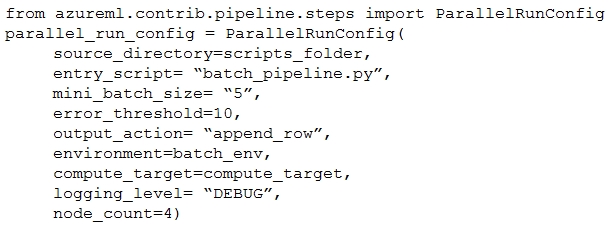
The question asks where to find the output from a batch inference pipeline using ParallelRunStep in Azure ML. According to the community discussion and Microsoft documentation, the ParallelRunStep class writes its output to a file named 'parallel_run_step.txt' in the specified output directory. This file contains concatenated output from all mini-batches processed by the pipeline, with each line representing output from a single mini-batch. The community consensus strongly supports option E, with 100% of users selecting it and multiple comments confirming this is the correct answer based on both exam experience and official documentation. Other options are incorrect: A (digit_identification.py) is the script being executed, not the output; B (debug log) contains debugging information, not the actual pipeline output; C (Activity Log) shows workspace activity, not pipeline results; D (Inference Clusters tab) shows cluster information, not execution output.
You create a batch inference pipeline using the Azure ML SDK. You configure the pipeline parameters by executing the following code:
pipeline_parameters = {
    "input_path": input_dataset.as_named_input("input").as_mount(),
    "output_path": output_dataset.as_mount()
}
pipeline_parameters = {
    "input_path": input_dataset.as_named_input("input").as_mount(),
    "output_path": output_dataset.as_mount()
}
You need to obtain the output from the pipeline execution. Where will you find the output?
A
the digit_identification.py script
B
the debug log
C
the Activity Log in the Azure portal for the Machine Learning workspace
D
the Inference Clusters tab in Machine Learning studio
E
a file named parallel_run_step.txt located in the output folder
No comments yet.