
Explanation:
The question requires recording a numerical metric (row count) that can be retrieved using the get_metrics method. According to Azure ML documentation and the community consensus (100% agreement on B), run.log() is the correct method for logging numerical metrics that are stored in the run record and accessible via get_metrics. Option A (upload_file) is for file uploads, not metrics. Option C (tag) is for adding metadata tags, not numerical metrics. Option D (log_table) is for logging tabular data. Option E (log_row) is for adding rows to a table, not logging single numerical values.
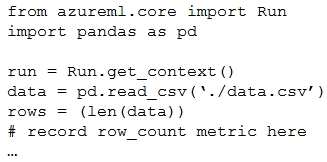
You write a Python script that processes data in a comma-separated values (CSV) file and plan to run it as an Azure Machine Learning experiment. The script loads the data and determines the number of rows it contains using the following code:
import pandas as pd
df = pd.read_csv('./data.csv')
row_count = len(df)
import pandas as pd
df = pd.read_csv('./data.csv')
row_count = len(df)
You need to record the row count as a metric named row_count that can be retrieved using the get_metrics method of the Run object after the experiment completes.
Which code should you use?
A
run.upload_file(T3 row_count', './data.csv')
B
run.log('row_count', rows)
C
run.tag('row_count', rows)
D
run.log_table('row_count', rows)
E
run.log_row('row_count', rows)
No comments yet.