
Explanation:
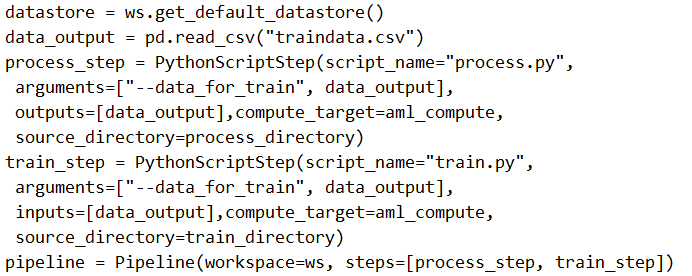
The solution does not meet the goal because the processing step (process_step) lacks an input to load data from the datastore. While the pipeline correctly defines two steps (process_step and train_step) and uses PipelineData to pass processed data between them, the process_step has no input specified to read the initial data from the datastore. According to Azure ML pipeline best practices and the community discussion (e.g., the top-voted comment with 14 upvotes highlights the missing input for process_step), a processing step must have an input (e.g., a Dataset or PipelineData object) to load data from the datastore. Without this, the process.py script cannot access the historical data, making the pipeline incomplete. The train_step is correctly configured to consume the processed data, but the overall pipeline fails due to the missing input in the first step.
You create a weather forecasting model using historical data and need to build a pipeline. This pipeline must execute a processing script to load data from a datastore, then pass the processed data to a training script for a machine learning model.
You implement the following solution:
# Code to create and run a pipeline
from azureml.core import Workspace, Dataset, Datastore
from azureml.pipeline.core import Pipeline, PipelineData
from azureml.pipeline.steps import PythonScriptStep

# Define the workspace, compute target, and datastore
ws = Workspace.from_config()
compute_target = ws.compute_targets['cpu-cluster']
datastore = ws.get_default_datastore()

# Create a PipelineData object to pass data between steps
processed_data = PipelineData('processed_data', datastore=datastore)

# Step 1: Data processing step
process_step = PythonScriptStep(
    name='process-data',
    script_name='process.py',
    arguments=['--output_path', processed_data],
    outputs=[processed_data],
    compute_target=compute_target,
    source_directory='.'
)

# Step 2: Model training step
train_step = PythonScriptStep(
    name='train-model',
    script_name='train.py',
    arguments=['--input_data', processed_data],
    inputs=[processed_data],
    compute_target=compute_target,
    source_directory='.'
)

# Create and run the pipeline
pipeline = Pipeline(workspace=ws, steps=[process_step, train_step])
pipeline_run = pipeline.submit('pipeline-experiment')
# Code to create and run a pipeline
from azureml.core import Workspace, Dataset, Datastore
from azureml.pipeline.core import Pipeline, PipelineData
from azureml.pipeline.steps import PythonScriptStep

# Define the workspace, compute target, and datastore
ws = Workspace.from_config()
compute_target = ws.compute_targets['cpu-cluster']
datastore = ws.get_default_datastore()

# Create a PipelineData object to pass data between steps
processed_data = PipelineData('processed_data', datastore=datastore)

# Step 1: Data processing step
process_step = PythonScriptStep(
    name='process-data',
    script_name='process.py',
    arguments=['--output_path', processed_data],
    outputs=[processed_data],
    compute_target=compute_target,
    source_directory='.'
)

# Step 2: Model training step
train_step = PythonScriptStep(
    name='train-model',
    script_name='train.py',
    arguments=['--input_data', processed_data],
    inputs=[processed_data],
    compute_target=compute_target,
    source_directory='.'
)

# Create and run the pipeline
pipeline = Pipeline(workspace=ws, steps=[process_step, train_step])
pipeline_run = pipeline.submit('pipeline-experiment')
Does this solution meet the goal?
A
Yes
B
No
No comments yet.