
Explanation:
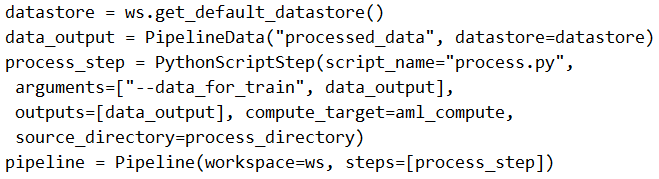
The solution does not meet the goal because it is missing a training step. The provided code defines a processing step that outputs processed_data via PipelineData, but there is no subsequent training step that consumes this output as input to train a machine learning model. The community discussion confirms this with 100% consensus on answer B, with comments noting 'There is no training step where the PipelineData (output of process_step) will be used as input' and 'Missing training step', which are upvoted. While the processing step is correctly configured to pass data, the absence of a training step means the pipeline cannot fulfill the requirement to 'pass the processed data to a machine learning model training script'.
You create a model to forecast weather conditions based on historical data. You need to create a pipeline that runs a processing script to load data from a datastore and pass the processed data to a machine learning model training script.
Solution: Run the following code:
from azureml.core import Workspace, Dataset, Experiment
from azureml.core.runconfig import RunConfiguration
from azureml.pipeline.core import Pipeline, PipelineData
from azureml.pipeline.steps import PythonScriptStep

# Define the data store and dataset
datastore = ws.get_default_datastore()
dataset = Dataset.get_by_name(ws, 'weather-data')

# Define the output for the processing step
processed_data = PipelineData('processed_data', datastore=datastore)

# Configure the processing step
processing_step = PythonScriptStep(
    name='process-data',
    script_name='process.py',
    arguments=['--input', dataset.as_named_input('input').as_mount(), '--output', processed_data],
    outputs=[processed_data],
    compute_target=compute_target,
    runconfig=run_config
)

# Configure the training step
training_step = PythonScriptStep(
    name='train-model',
    script_name='train.py',
    arguments=['--input', processed_data],
    inputs=[processed_data],
    compute_target=compute_target,
    runconfig=run_config
)

# Create and run the pipeline
pipeline = Pipeline(workspace=ws, steps=[processing_step, training_step])
pipeline_run = Experiment(ws, 'weather_forecast_pipeline').submit(pipeline)
from azureml.core import Workspace, Dataset, Experiment
from azureml.core.runconfig import RunConfiguration
from azureml.pipeline.core import Pipeline, PipelineData
from azureml.pipeline.steps import PythonScriptStep

# Define the data store and dataset
datastore = ws.get_default_datastore()
dataset = Dataset.get_by_name(ws, 'weather-data')

# Define the output for the processing step
processed_data = PipelineData('processed_data', datastore=datastore)

# Configure the processing step
processing_step = PythonScriptStep(
    name='process-data',
    script_name='process.py',
    arguments=['--input', dataset.as_named_input('input').as_mount(), '--output', processed_data],
    outputs=[processed_data],
    compute_target=compute_target,
    runconfig=run_config
)

# Configure the training step
training_step = PythonScriptStep(
    name='train-model',
    script_name='train.py',
    arguments=['--input', processed_data],
    inputs=[processed_data],
    compute_target=compute_target,
    runconfig=run_config
)

# Create and run the pipeline
pipeline = Pipeline(workspace=ws, steps=[processing_step, training_step])
pipeline_run = Experiment(ws, 'weather_forecast_pipeline').submit(pipeline)
Does the solution meet the goal?
A
Yes
B
No
No comments yet.