
Explanation:
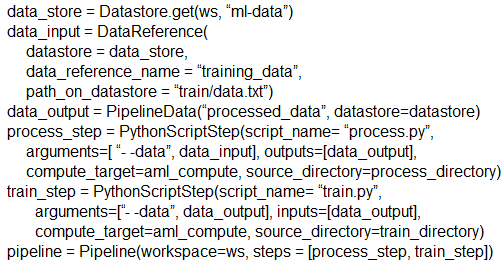
The solution does NOT meet the goal. While the code structure appears correct at first glance, there are critical issues: 1) The processing step lacks an output definition - it processes data but doesn't specify where to store the processed output that should be passed to the training step. 2) The training step references 'processing_step.output' but this output is never defined in the processing step. 3) Community discussion confirms this is problematic, with multiple users noting missing output arguments and the fact that DataReference (which would be needed for proper data passing) is deprecated. The most upvoted comments (12 upvotes) state the answer should be 'No', and detailed code examples show that proper pipeline steps require explicit output definitions using PipelineData or modern alternatives like FileOutputDatasetConfig.
You create a weather forecasting model and need to build a pipeline that executes a processing script to load data from a datastore. The processed data must then be passed to a training script.
You implement the following solution:
from azureml.pipeline.core import Pipeline
from azureml.pipeline.steps import PythonScriptStep

# Define the processing step
processing_step = PythonScriptStep(
    name='process_data',
    script_name='processing_script.py',
    arguments=['--input_data', input_dataset],
    inputs=[input_dataset],
    compute_target=compute_cluster,
    source_directory=source_dir
)

# Define the training step
training_step = PythonScriptStep(
    name='train_model',
    script_name='training_script.py',
    arguments=['--input_data', processing_step.output],
    inputs=[processing_step.output],
    compute_target=compute_cluster,
    source_directory=source_dir
)

# Create and run the pipeline
pipeline = Pipeline(workspace=ws, steps=[processing_step, training_step])
pipeline_run = experiment.submit(pipeline)
from azureml.pipeline.core import Pipeline
from azureml.pipeline.steps import PythonScriptStep

# Define the processing step
processing_step = PythonScriptStep(
    name='process_data',
    script_name='processing_script.py',
    arguments=['--input_data', input_dataset],
    inputs=[input_dataset],
    compute_target=compute_cluster,
    source_directory=source_dir
)

# Define the training step
training_step = PythonScriptStep(
    name='train_model',
    script_name='training_script.py',
    arguments=['--input_data', processing_step.output],
    inputs=[processing_step.output],
    compute_target=compute_cluster,
    source_directory=source_dir
)

# Create and run the pipeline
pipeline = Pipeline(workspace=ws, steps=[processing_step, training_step])
pipeline_run = experiment.submit(pipeline)
Does this solution meet the goal?
A
Yes
B
No
No comments yet.