
Explanation:
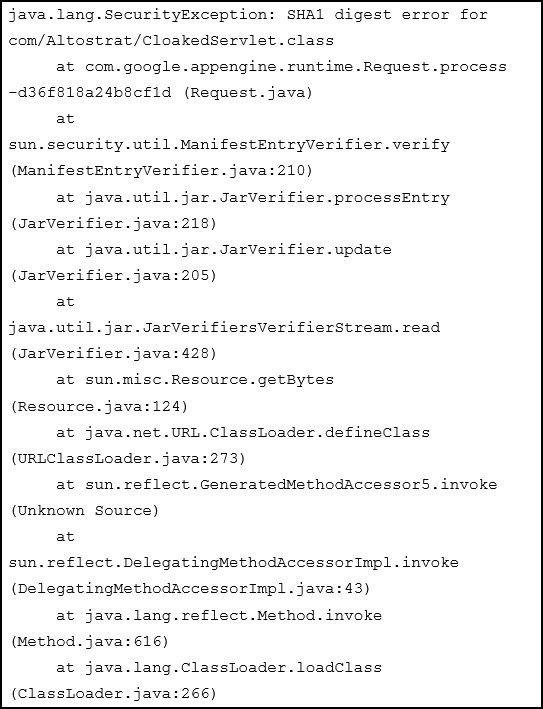
The SHA1 digest error in the stack trace indicates a JAR file integrity issue, specifically that the digital signature verification failed. This is a security measure in Java where JAR files must be properly signed to ensure they haven't been tampered with. Option B addresses this by digitally signing all JAR files, which validates their authenticity and integrity. The community discussion strongly supports B (75% consensus) with high upvotes on comments explaining that JAR signing resolves SHA1 digest errors and is required by App Engine for security. Option A (uploading missing JARs) is less suitable as the error is about signature mismatch, not missing files. Option C (recompiling with MD5) is incorrect because it doesn't fix the underlying signing issue and SHA1 is still valid for signatures in many contexts.
Your custom Java application deployment to Google App Engine has failed. Based on the provided stack trace, what is the recommended course of action?
A
Upload missing JAR files and redeploy your application.
B
Digitally sign all of your JAR files and redeploy your application
C
Recompile the CLoakedServlet class using and MD5 hash instead of SHA1
No comments yet.