
Explanation:
When creating an external table in Azure Synapse Analytics serverless SQL pool with LOCATION='/topfolder/', the behavior differs from dedicated SQL pools and Hadoop external tables.
Native External Tables in Serverless SQL Pools: Unlike Hadoop external tables or dedicated SQL pool external tables, native external tables in serverless SQL pools do not automatically traverse subfolders unless explicitly specified.
Recursive Folder Traversal: To enable recursive traversal of subfolders, you must append /** to the location path. Without this wildcard pattern, the external table will only access files located directly in the specified folder.
File Access Behavior:
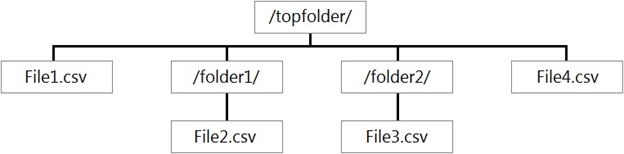
LOCATION='/topfolder/': Only files directly in /topfolder/ are accessibleLOCATION='/topfolder/**': All files in /topfolder/ and its subfolders are accessibleBased on the folder structure shown in the exhibit:
/topfolder//topfolder/folder1/ (subfolder)/topfolder/folder2/ (subfolder)Since the external table was created with LOCATION='/topfolder/' (without the /** wildcard), only files directly in the /topfolder/ directory will be returned when querying the table.
LOCATION='/topfolder/**' to enable recursive subfolder traversal./topfolder/ directory.This behavior is by design in serverless SQL pools to provide more granular control over file access and avoid unintended data exposure from nested folder structures.
You have an Azure Data Lake Storage Gen2 account containing files and folders for an Azure Synapse workspace, as illustrated in the provided exhibit.
You create an external table named ExtTable with the LOCATION set to '/topfolder/'.
When you query ExtTable using an Azure Synapse Analytics serverless SQL pool, which files are returned?
A
File2.csv and File3.csv only
B
File1.csv and File4.csv only
C
File1.csv, File2.csv, File3.csv, and File4.csv
D
File1.csv only
No comments yet.