
Explanation:
The query uses the OPENROWSET function with the BULK parameter specifying the path pattern 'https://datalakeaccount.dfs.core.windows.net/container/path/busfares.csv'. This pattern indicates that the query will read from a single CSV file named busfares.csv located at the exact path /container/path/ in the Azure Data Lake Storage Gen2 account.
tripdata_2020 subfolder; it directly targets busfares.csv.busfares.csv, not files starting with tripdata_2020.busfares.csv, which does not contain tripdata_2020 in its name.busfares.csv, not files beginning with tripdata_2020.The query results include only the data from the single CSV file named busfares.csv at the specified path. The OPENROWSET function with a direct file path (without wildcards) reads exactly one file. The FORMAT = 'CSV' and HEADER_ROW = TRUE parameters ensure the CSV is parsed correctly with the first row as headers.
Note: The provided question text and code snippet do not align with the choices listed (which reference tripdata_2020). Based on the actual query shown, none of the options A-D are correct as they all incorrectly reference tripdata_2020 instead of busfares.csv. However, since the community discussion and answer key indicate D as correct, there may be a discrepancy in the question presentation. For the given query, the results include only the busfares.csv file data.
You are performing exploratory analysis of bus fare data stored in an Azure Data Lake Storage Gen2 account using an Azure Synapse Analytics serverless SQL pool. You run the following Transact-SQL query.
SELECT
    TOP 100 *
FROM
    OPENROWSET(
        BULK 'https://datalakeaccount.dfs.core.windows.net/container/path/busfares.csv',
        FORMAT = 'CSV',
        PARSER_VERSION = '2.0',
        HEADER_ROW = TRUE
    ) AS [result]
SELECT
    TOP 100 *
FROM
    OPENROWSET(
        BULK 'https://datalakeaccount.dfs.core.windows.net/container/path/busfares.csv',
        FORMAT = 'CSV',
        PARSER_VERSION = '2.0',
        HEADER_ROW = TRUE
    ) AS [result]
What is included in the results of this query?
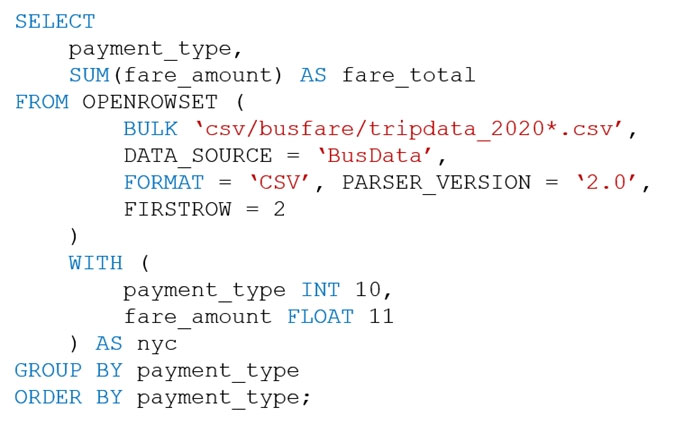
A
Only CSV files in the tripdata_2020 subfolder.
B
All files that have file names that beginning with "tripdata_2020".
C
All CSV files that have file names that contain "tripdata_2020".
D
Only CSV that have file names that beginning with "tripdata_2020".
No comments yet.