
Answer-first summary for fast verification
Answer: a skipped dependency on the Upon Success activity
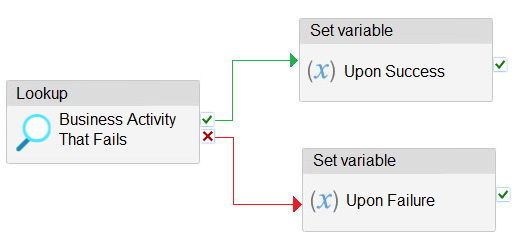
## Explanation In Azure Data Factory/Azure Synapse Analytics pipelines, the **final pipeline status** is determined by the status of all activities that don't have subsequent dependencies. When implementing error handling patterns, we need to ensure that at least one path in the pipeline completes successfully to guarantee the overall pipeline status shows as "Succeeded." ### Why Option B is Correct **A skipped dependency on the "Upon Success" activity** creates a robust error handling pattern known as the "Do If Skip Else" pattern. Here's how it works: 1. **Business Activity That Fails** executes first 2. If it succeeds → "Upon Success" path runs (normal execution) 3. If it fails → "Upon Failure" path runs (error handling) 4. The **skipped dependency** ensures that when the failure path executes, the success path is marked as "Skipped" rather than remaining as an unhandled activity This configuration guarantees that: - The pipeline always has at least one successfully completed terminal activity - No activities remain in an unhandled state - The final pipeline status will always be "Succeeded" regardless of whether the main business activity passes or fails ### Why Other Options Are Incorrect - **Option A (skipped dependency on Upon Failure)**: This would incorrectly skip the error handling path when needed, potentially leaving errors unhandled - **Option C (success dependency on Business Activity That Fails)**: This creates a standard sequential flow but doesn't address the pipeline status requirement when failures occur - **Option D (failure dependency on Upon Failure)**: This would only trigger the failure path when the failure path itself fails, which doesn't solve the pipeline status problem This approach aligns with Azure's recommended patterns for ensuring pipeline success status while maintaining proper error handling capabilities.
Author: LeetQuiz Editorial Team
Ultimate access to all questions.
No comments yet.
You have an Azure Synapse Analytics pipeline that includes a failure path. You need to add a Set Variable activity to the pipeline to ensure the final pipeline status is reported as "Succeeded" upon completion.
What should you configure for the Set Variable activity?
A
a skipped dependency on the Upon Failure activity
B
a skipped dependency on the Upon Success activity
C
a success dependency on the Business Activity That Fails activity
D
a failure dependency on the Upon Failure activity