
Explanation:
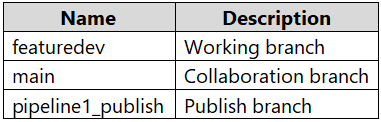
In Azure Synapse Analytics with Azure Repos integration, the standard Git workflow follows a feature branch strategy where development occurs in feature branches (like featuredev) and changes are merged into the collaboration branch (typically main) through pull requests.
Why Option A is correct:
featuredev), the proper first step to publish changes is to create a pull request from the feature branch to the collaboration branch (main)Why other options are incorrect:
main is incorrect because main is the collaboration branch that should receive changes from feature branches, not initiate themPublish_config.json file is not part of the standard publishing workflow in Azure Synapse Analytics with Git integrationThe correct sequence is: develop in feature branch → create pull request to main → review and merge → publish changes from the collaboration branch.
No comments yet.
You have an Azure subscription containing an Azure Synapse Analytics account integrated with an Azure Repos repository named Repo1. The repository contains the following branches: main, featuredev, and release. You have developed and tested changes to Pipeline1 in the featuredev branch.
You need to publish the changes.
What should you do first?
A
From featuredev, create a pull request.
B
From main, create a pull request.
C
Add a Publish_config.json file to the root folder of the collaboration branch.
D
Switch to live mode.