
Explanation:
To implement Azure Synapse Link for Azure SQL Database, two key configuration steps are required on the SQL Database instance (sql1):
A. Update the firewall rules to allow Azure services to access sql1 - This is essential because Azure Synapse Link requires network connectivity between the Azure Synapse Analytics workspace and the Azure SQL Database. By allowing Azure services through the firewall, you enable the necessary communication path for data replication and synchronization between the two services.
B. Enable the system-assigned managed identity - This provides secure, credential-free authentication between Azure services. The system-assigned managed identity allows Azure Synapse Analytics to authenticate to Azure SQL Database without requiring explicit connection strings or stored credentials, following Azure security best practices for service-to-service authentication.
Why other options are not correct:
C. Assign the Contributor role to the system-assigned managed identity - This is unnecessary and overly permissive. Azure Synapse Link only requires database-level permissions (such as db_owner or specific data reading permissions) on the SQL Database, not subscription-level Contributor role access which grants broad management capabilities beyond what's needed for data synchronization.
D. Disable Transparent Data Encryption (TDE) - This is incorrect and goes against security best practices. TDE provides encryption at rest for database files and doesn't interfere with Azure Synapse Link functionality. Disabling TDE would compromise data security without providing any benefit for Synapse Link implementation.
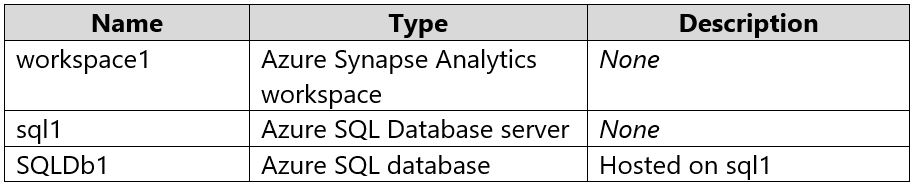
You have an Azure subscription containing the resources shown in the provided image.
You need to implement Azure Synapse Link for Azure SQL Database.
Which two actions should you perform on sql1? Each correct answer presents part of the solution.
NOTE: Each correct selection is worth one point.
A
Update the firewall rules to allow Azure services to access sql1.
B
Enable the system-assigned managed identity.
C
From the Access control (IAM) settings, assign the Contributor role to the system-assigned managed identity of workspace1.
D
Disable Transparent Data Encryption (TDE).
No comments yet.