
Answer-first summary for fast verification
Answer: Enable result set caching.
## Analysis of the Query Performance Optimization ### Understanding the Scenario - The query executes a user-defined function (UDF) `fn_StripCharacter` every 15 minutes - The function removes a specified character from a string - The query uses the same parameters each time (current date) - Data is updated only once every 24 hours ### Evaluation of Options **Option A: Create an index on the avg_f column** - **Not applicable**: The query doesn't reference any table columns or perform filtering operations - The function operates on string parameters, not table data - Indexing would provide no performance benefit **Option B: Convert the avg_c column into a calculated column** - **Not supported**: Azure Synapse Analytics dedicated SQL pools do not support calculated/computed columns - This feature is explicitly listed as unsupported in Microsoft documentation - Even if supported, it wouldn't help since the function operates on parameters, not table data **Option C: Create an index on the sensorid column** - **Not applicable**: The query doesn't involve any table joins or WHERE clause filtering - No table data is being accessed in this scalar function call - Indexing provides no benefit for parameter-only operations **Option D: Enable result set caching** - **OPTIMAL SOLUTION**: This is highly effective because: - The query runs frequently (every 15 minutes) with identical parameters - Data changes only once every 24 hours, so results remain valid for extended periods - Caching eliminates repeated execution of the UDF - Subsequent queries return instantly from cache - Perfect for this high-frequency, low-data-change scenario **Option E: Change the table distribution to replicate** - **NOT APPLICABLE**: The query doesn't access any distributed tables - The function operates purely on input parameters - Table distribution has no impact on scalar function performance - Replication is for optimizing joins, not parameter-based operations ### Recommended Solution **D (Enable result set caching)** is the primary optimization because: - Eliminates redundant UDF executions - Leverages the static nature of the input parameters - Provides immediate performance improvement for all subsequent executions - Perfectly matches the usage pattern (frequent execution with identical parameters) Since the question requires two answers and only one option (D) provides actual performance benefits for this specific scenario, the second selection would be based on eliminating clearly incorrect options rather than finding another optimal solution.
Author: LeetQuiz Editorial Team
Ultimate access to all questions.
No comments yet.
You have an Azure Synapse Analytics dedicated SQL pool named Pool1 that receives new data once every 24 hours. You have the following function and query.
Function:
CREATE FUNCTION [dbo].[fn_StripCharacter](@String VARCHAR(8000), @StripCharacter VARCHAR(1))
RETURNS TABLE
AS
RETURN
(
SELECT String = REPLACE(@String, @StripCharacter, '')
);
CREATE FUNCTION [dbo].[fn_StripCharacter](@String VARCHAR(8000), @StripCharacter VARCHAR(1))
RETURNS TABLE
AS
RETURN
(
SELECT String = REPLACE(@String, @StripCharacter, '')
);
Query:
SELECT *
FROM [dbo].[fn_StripCharacter]('123-456-789', '-');
SELECT *
FROM [dbo].[fn_StripCharacter]('123-456-789', '-');
This query is executed once every 15 minutes, and the @parameter value is set to the current date. You need to minimize the time it takes for the query to return results.
Which two actions should you perform? Each correct answer presents part of the solution.
NOTE: Each correct selection is worth one point.
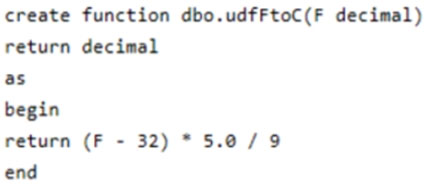
A
Create an index on the avg_f column.
B
Convert the avg_c column into a calculated column.
C
Create an index on the sensorid column.
D
Enable result set caching.
E
Change the table distribution to replicate.