Explanation
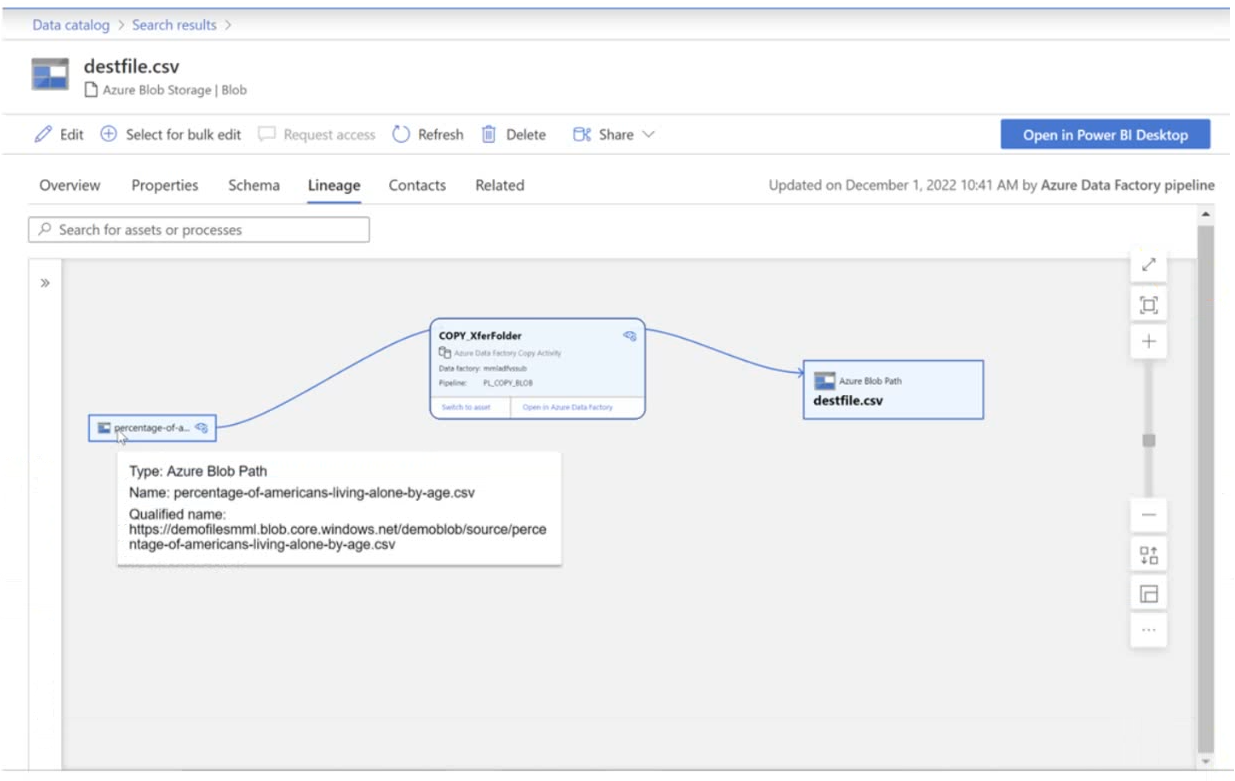
In Microsoft Purview, lineage data can be populated through multiple methods, but the specific scenario described in the question indicates that the lineage is populated by executing a Data Factory pipeline.
Why Option C is Correct
- Azure Data Factory Integration: Microsoft Purview has native integration with Azure Data Factory that automatically captures and pushes lineage information when Data Factory pipelines execute.
- Automated Lineage Collection: When a Data Factory pipeline processes data (such as reading from a source, transforming it, and writing to a destination like a CSV file), the lineage metadata is automatically collected and sent to Purview.
- Real-time Lineage Tracking: This method provides automated, real-time lineage tracking without manual intervention, ensuring accurate and up-to-date lineage information.
Why Other Options Are Not Suitable
- Option A (manually): Manual lineage population is possible in Purview but is time-consuming, error-prone, and doesn't scale well for dynamic data environments. It's not the optimal method for automated lineage collection.
- Option B (by scanning data stores): While Purview can scan data stores to discover assets and schema information, scanning alone doesn't capture the detailed data movement and transformation lineage that occurs during pipeline executions.
Best Practices Consideration
For comprehensive data governance in Azure environments, leveraging the native integration between Azure Data Factory and Microsoft Purview is the recommended approach. This ensures:
- Automated lineage capture without additional development effort
- Accurate tracking of data transformations and movements
- Real-time lineage updates as pipelines execute
- Reduced manual maintenance overhead
The exhibit referenced in the question would typically show a lineage diagram with Data Factory pipeline components, confirming that pipeline execution is the source of the lineage data.