
Answer-first summary for fast verification
Answer: Default ג€" Read, Default ג€" Execute
## Analysis of ACL Requirements for Azure Data Lake Storage Gen2 ### Understanding ACL Types - **Access ACLs**: Control access to existing objects (files and directories). Permissions apply only to the specific object where they are set. - **Default ACLs**: Act as templates that determine the access ACLs for any child items created under a directory. They ensure inheritance of permissions to newly created items. ### Requirements Analysis 1. **Traverse child items that are created in Folder2**: - Traverse permission requires **Execute** permission on directories - Since these are "child items that are created" (future items), we need Default ACLs to ensure the traverse permission applies to newly created subdirectories - **Default - Execute** (F) is required 2. **Read files that are created in Folder2**: - Read permission on files requires **Read** permission - Since these are "files that are created" (future files), we need Default ACLs to ensure read permission applies to newly created files - **Default - Read** (D) is required ### Why These Options Are Optimal - **Default ACLs are necessary** because the requirements specify actions on items "that are created" - indicating future items that don't exist yet - **Access ACLs alone are insufficient** because they only apply to existing items and won't automatically propagate to newly created child items - **Principle of least privilege** is maintained by only granting the specific Default permissions needed (Read and Execute) without unnecessary permissions ### Why Other Options Are Less Suitable - **Access - Execute (C)**: Only applies to existing items, won't help with traversing newly created child directories - **Access - Read (A)**: Only applies to existing files, won't help with reading newly created files - **Default - Write (E)**: Not required by the specified requirements - **Access - Write (B)**: Not required and violates least privilege ### Key Insight In Azure Data Lake Storage Gen2, permissions are not automatically inherited from parent directories unless Default ACLs are configured. Since the requirements specifically mention items "that are created" (future items), Default ACLs are mandatory to ensure the permissions propagate to newly created child items.
Author: LeetQuiz Editorial Team
Ultimate access to all questions.
No comments yet.
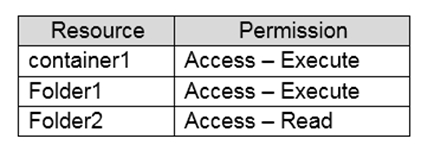
You have an Azure subscription with an Azure Active Directory tenant containing a service principal named ServicePrincipal1. The subscription contains an Azure Data Lake Storage Gen2 account named adls1. This account has a folder named Folder2 with the URI https://adls1.dfs.core.windows.net/container1/Folder1/Folder2/.
ServicePrincipal1 has the following access control list (ACL) permissions assigned: [Table showing existing ACL permissions for ServicePrincipal1]
You need to ensure ServicePrincipal1 can perform these actions on items created in Folder2:
The solution must follow the principle of least privilege.
Which two permissions should you grant to ServicePrincipal1 on Folder2? Each correct answer presents part of the solution.
NOTE: Each correct selection is worth one point.
A
Access ג€" Read
B
Access ג€" Write
C
Access ג€" Execute
D
Default ג€" Read
E
Default ג€" Write
F
Default ג€" Execute