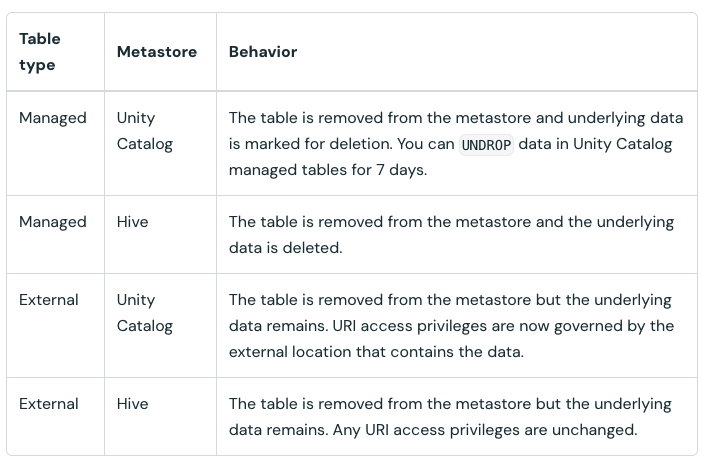
Explanation:
By default, the DROP TABLE command removes the table's metadata and definition from the metastore/catalog but does not physically delete the underlying data files in storage if the table is external by specifying the LOCATION. This design provides a safeguard against accidental table drops, allowing the table to be restored by re-creating it using the existing data path. To ensure the physical deletion of the data files along with the metadata, the PURGE keyword must be explicitly included in the command.
A Delta Lake table was established using the following query:
CREATE TABLE prod.sales_by_store
USING DELTA
LOCATION 'abfss://sales@datalake.dfs.core.windows.net/prod/sales_by_store'
AS
SELECT *
FROM prod.sales a
INNER JOIN prod.store b
ON a.store_id = b.store_id;
CREATE TABLE prod.sales_by_store
USING DELTA
LOCATION 'abfss://sales@datalake.dfs.core.windows.net/prod/sales_by_store'
AS
SELECT *
FROM prod.sales a
INNER JOIN prod.store b
ON a.store_id = b.store_id;
If a workspace administrator executes the command DROP TABLE prod.sales_by_store, what is the expected outcome?
A
The table definition is removed from the catalog, and all underlying data files are permanently deleted from storage.
B
The operation will fail with an error because Delta Lake prohibits the manual deletion of production-level tables.
C
The table is removed from the catalog, but the underlying data files remain preserved in storage.
D
The data is logically deleted and becomes inaccessible via standard queries but remains recoverable through Time Travel.